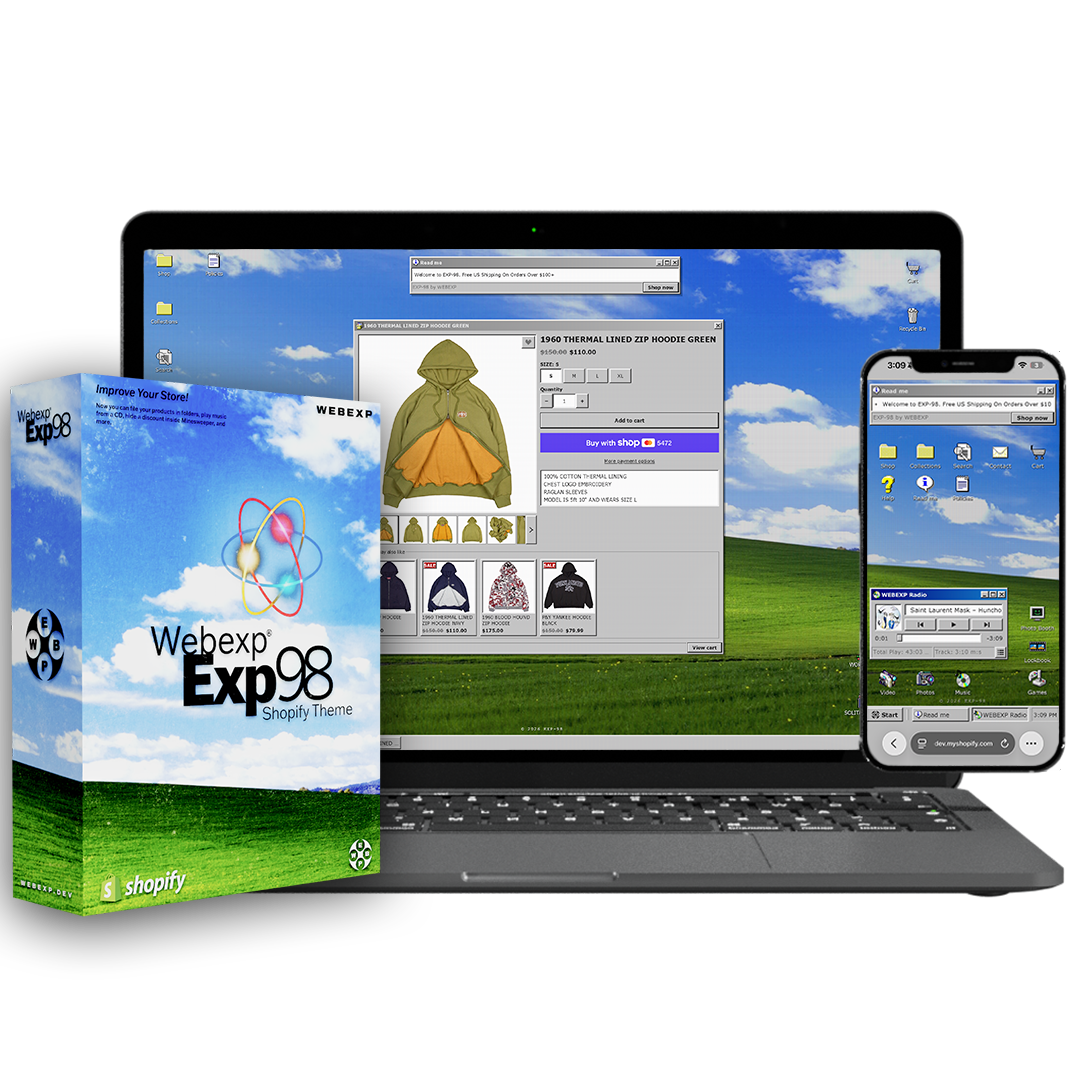







EXP-98 Shopify Theme
$219A Windows 98 desktop that happens to be a shop.View Store DemoPassword: EXP Installation — Self InstallWhat's included with Install For Me?
Our team sets up the theme in your store — installing it, adding your logo and backgrounds, building the sections, and assigning your collections, menus, and metafields. You just send your assets and a collaborator invite after checkout.EXP-98 by WEBEXP is a Windows 98 style Shopify theme that turns your store into a retro desktop, with folders, product windows, a Start menu, a CD player and built-in games.
View the live demo: exp-98.webexp.dev (password: EXP)
A Windows 98 desktop that happens to be a shop.
Grey windows with blue title bars. A Start button. Folders for your collections, products that open in their own windows, a cart that's a dialog box, and a taskbar along the bottom with a clock in the corner. A CD player playing your music. Screensavers when nobody's touched anything for a while. Minesweeper.
EXP-98 is a retro Shopify theme that turns your store into a 1998 desktop — and underneath the costume it is a real store. Every product, collection and page has its real URL, so links can be shared, indexed and advertised. It just happens to open in a window.
Built from an empty folder, not a Dawn reskin. The windows drag, stack, minimise and maximise. The Start menu has your pages in it. On a phone the desktop becomes a grid of icons and the windows fill the screen, and every game is playable with a thumb.
It's built to be played with, and built so that playing with it keeps people looking at your products.
Music with a full-screen visualizer that moves to the song. Eight games that can hand out a discount code when someone wins. A Photo Booth that turns a selfie into ASCII art. A Lookbook that plays your collection as a slideshow in a Media Player window. A screensaver with 3D pipes. People screen-record this kind of thing and send it to each other, and the store they send is yours.
The drop is covered too.
A password page with a countdown in Minesweeper digits, an email sign-up (built in, or paste your Klaviyo form), games to play your way in, and an Enter button at zero that types the password for waiting customers. An enter gate before the store with a boot screen and a Windows log-on, over your own image or video, with a start-up sound.
One tier. Everything below is in it.
The Desktop
- Shortcut icons — shop, collections, search, contact, cart, policies, help, your own links, with your own icons if you like
- Windows that drag, stack, minimise and maximise, with an Opening… dialog the first time each one opens
- Start menu with your pages, socials, Sleep and Shut down
- Taskbar with a button per open window, a tray clock, your social links and the cart
- Read me windows for announcements, a Recycle Bin that keeps what leaves the cart, a Favorites folder
- Display Properties — shoppers pick their own colour scheme and mouse trails
- Blue-screen 404
The Shop
- Collections as folders — Icons, List and Details views, filters and sorting
- Product windows with a square gallery that plays video and 3D models, variant buttons, a size chart, and You may also like
- Low-stock notice; Sale, New and your own badges
- Cart dialog with a goal progress bar (free shipping, free gift) and a You may also like shelf
- Predictive search with filters on the results
- Desktop cells for a collection or a product, and a window that opens on arrival for one-product stores and drops
- SEO and structured data written for you
The Toys
- CD Player — up to 12 tracks, cover art printed on a spinning disc, keeps playing between pages, full-screen visualizer with 24 looks
- The studio — maximise the player and it's a Winamp-style mixer: ten-band equalizer with presets, filter, echo, and the visualizer in a window
- Eight games — MATCH, WORM, MINEFIELD, BRICKS, WALLS, PIPES, PUZZLE, SOLITAIRE — just for fun or revealing a discount code
- Photo Booth — an ASCII art studio: a photo or a camera shot, presets, sliders, effects, saved as a picture. Nothing is uploaded
- Lookbook — a collection played as a slideshow in a Media Player window
- Videos and Photos windows, a Profile page styled as a 2006 social profile
- Screensavers — bouncing logo, starfield, Mystify, 3D pipes, 3D maze, 3D text
- Opt-in system sounds — the start-up chime, clicks, the recycle bin
The Drop
- Enter gate — boot screen (optional) and a Windows 98 log-on, over your image or video, with a start-up sound
- Password page with a countdown, Minesweeper digits, built-in email capture or a Klaviyo embed, and games
- Enter button at zero — types your storefront password for the visitor
- Email sign-up dialog
Yours to change
- Seven palettes — each a full skin, chrome, title bars, buttons and icons together
- Wallpaper image or video, CRT screen effect, switch-on animation, pixel grid
- Large or classic icon size, large or classic taskbar, single or double click to open
- Every setting explained in plain English in the editor, with links to the admin page it needs
Who it's for
Streetwear, music, merch, zines, anything with a following. Brands whose store is part of the brand — where someone opening the site for the first time should want to show it to a friend.
Why EXP-98
Nostalgia themes usually stop at a font and a grey button. This one is the whole operating system: windows that behave like windows, a taskbar that works, music, games, a screensaver. It doesn't look like 1998. It is, with checkout.
Includes a full documentation site and a step-by-step setup guide. Install it in an afternoon.
EXP-98 is an independent theme by WEBEXP. It is not affiliated with, endorsed by, or connected to Microsoft. Windows is a trademark of Microsoft Corporation.
To self-install, follow our tutorial here:
https://www.youtube.com//@webexp
If you'd rather have the WEBEXP team install your theme, select the "Install For Me" option above. We will reach out to you via the email provided at checkout.
If you don't have an active Shopify store, we will start one for you!
- A Mac or Windows Desktop/Laptop
- An Active Shopify Subscription
If you don't have an active Shopify store, we can start one for you!
Or try a Shopify trial for 3 days free + 3 months for $1 each! Click Here To Claim
Due to this being a digital product, all sales are final.
View our full refund policy here
For any questions or concerns, you can contact us via email:
or via Instagram:
@webexp.dev
Valid for one year from the date of purchase. Includes all updates and support released during the license period at no additional cost. To continue receiving updates after the first year, the license must be renewed annually. Renewal is not required — your theme will remain fully functional without it. There are no automatic subscription fees.
1 License = 1 Shopify store.
By purchasing this product, you have read and agreed with our license agreement terms. Breaking these terms will result in a lifetime ban from purchasing future WEBEXP assets and legal action taken against you.
View our full license terms Here
Windows, folders, a Start menu. And checkout.
A desktop you shop on. Recorded on a phone, straight from the demo store.
Recorded on iPhone — EXP-98 demo store
Not a retro font. An operating system.
Nostalgia themes usually stop at a pixel typeface and a grey button. EXP-98 is the whole desktop: windows that behave like windows, a taskbar that works, music, games and a screensaver — on real product URLs.
A hero banner, a grid, a footer. The same page as everyone else.
Folders for collections, products in windows, a cart that's a dialog box, and a Start menu along the bottom.
The whole operating system.
A desktop, a shop, and every toy that keeps people on the page — in one tier.
Your home page is a desktop: shortcut icons for the shop, collections, search, contact and cart, a Read me window for announcements, and the toys along the bottom. Windows drag, stack, minimise and maximise. On a phone it's a grid of icons with windows that fill the screen.
Double-click a folder and the collection opens as a file explorer — Icons, List or Details view, with filters and sorting in the toolbar. Every file is a product with its real URL.
A square gallery that plays video and 3D models, variant buttons, a low-stock notice, Sale and New badges, a size chart dialog, and a You may also like shelf that folds away.
A goal progress bar toward free shipping or a free gift, a You may also like shelf, and a Recycle Bin that keeps whatever leaves the cart until the shopper empties it.
Up to twelve tracks with cover art printed on a spinning disc. Keeps playing as shoppers browse. Tap the disc for a full-screen visualizer with 24 looks that move to the song — tunnels, a cave, your cover art melting into the picture.
Maximise the player and it becomes a Winamp-style studio: the visualizer in a window beside a ten-band equalizer with presets, a filter sweep and an echo. An easter egg for whoever presses the button.
MATCH, WORM, MINEFIELD, BRICKS, WALLS, PIPES, PUZZLE and SOLITAIRE, every one playable with a thumb. Just for fun, or set a game to reveal a discount code when someone wins.
An ASCII art studio. Shoppers open a photo or take one with the camera, pick a preset, move the sliders, add an effect and save the picture. Nothing is uploaded — it all happens on their device.
A collection played as a slideshow in a Media Player window — progress bar, seek bar, play and pause. Tap the picture to open the product.
Leave the page alone for a minute and it goes to a screensaver: the bouncing logo, a starfield, Mystify, 3D pipes, a 3D maze or 3D text. Any tap wakes it, and only wakes it.
A boot screen (optional) and a Windows 98 log-on window that types itself in, over your own image or video, with a start-up sound when they press Enter. Every visit, or once per session.
A countdown in Minesweeper digits, built-in email capture or your Klaviyo form, games to play your way in, and an Enter button at zero that types the password for waiting customers.
Seven palettes for you, and a Display Properties window for your shoppers — their own colour scheme and mouse trails, remembered on their browser.
Your About page as a 2006 social profile: picture, Online Now!, Details, About me, a Top 8 and a wall of comments. A song from your player can start when it opens.
Every product, collection and page has its real address. Links can be shared, indexed and advertised, and the SEO and structured data are written for you.
Built with support.
Every purchase includes everything you need to launch confidently. If something breaks, we fix it.
Every setting, section and metafield explained in writing.
Email SupportDirect line to the developer. We respond within 1 to 2 business days.
A printable setup guide ships with the theme.
1 year of bug fixes and feature updates included.
FAQ
Common questions
Everything you need to know before you buy.
One-time purchase. You pay once and the theme is yours — no monthly fees, no recurring charges. Your purchase includes 1 year of updates and email support; the theme keeps working after that whether or not you renew.
It's a real store. Every product, collection and page has its own URL and opens in a window; add to cart, the cart and checkout all work the way Shopify's do. The desktop is the costume — the shop underneath is complete, with filters, predictive search, variants, video and 3D media, badges, a size chart and the SEO and structured data written for you.
No. The music player, visualizer, games, Photo Booth, Lookbook, screensavers, enter gate and countdown password page are all built into the theme. If you'd rather collect emails through Klaviyo or another app, you can paste an embed into the password page or the sign-up dialog instead of using the built-in field.
The same desktop, laid out for a thumb: a grid of icons, windows that fill the screen and stack, the taskbar along the bottom with the cart and the clock. Every game works with taps only — nothing needs a keyboard or dragging.
No, and it's worth being clear about this. When the countdown reaches zero it shows an Enter button that types your storefront password for that visitor, so waiting customers get through without typing it. Your store stays password-protected until you turn protection off yourself under Online Store → Preferences.
Each game has a setting for what winning reveals: nothing (just for fun — the default), a discount code you've created under Discounts, or your store password on the password page. Winning shows the code with an Apply and shop button. Put a usage limit on the code; the reward is written into the page, so anyone determined can read it.
No. Every toy is a block or a setting you can switch off in the theme editor. Without them you still have the desktop, the folders and the windows — a store that happens to look like 1998.
EXP-98 works on every Shopify plan — Basic, Shopify, Advanced and Plus. It's built on Shopify 2.0 (Online Store 2.0), which is supported across all of them.
No. EXP-98 is a standard Shopify theme — you upload the .zip in your admin under Online Store → Themes → Add theme, and it's ready to customise. If you'd rather not touch it at all, add Install For Me above and our team sets it up for you.
Yes. It reads your existing products, collections and menus. The size chart and your own product badges are the only features that need anything extra — a metafield each, explained step by step in the documentation.
You upload your MP3s under Content → Files and paste the links into the player's track blocks — up to twelve. Use music you have the rights to play. The player waits for the shopper's first tap, as every browser requires, and keeps playing as they move around the store.
Instantly. After checkout you'll get an email with a download link containing the theme .zip and a printable setup guide PDF. No waiting, no approval process.
Each licence covers one Shopify store. If you run multiple stores you'll need a licence for each. This is standard across the industry.
Seven palettes in the theme editor, each a full skin — desktop, window chrome, title bars, buttons and the icon set recoloured together — plus your own wallpaper image or video and a CRT screen effect. Your shoppers get a Display Properties window of their own to pick a scheme. There are no font pickers on purpose: the type is part of the look.
Because EXP-98 is a digital product delivered instantly, we don't offer refunds after download. Check the live demo thoroughly before buying — it runs the real theme.
Give them a reason to stay.
A store people open, play with, and send to a friend.
One-time purchase · Instant download · Free updates for 1 yearSave this for later — get 10% off.
We'll send the demo link and a private code straight to your inbox.
- Choosing a selection results in a full page refresh.
- Opens in a new window.
Browse our themes and apps to get started.
Explore Products